Introduction to Video Projection Mapping
This five-day course aimed at beginners will give you a unique opportunity to learn and develop the necessary skills to prepare and project video onto a 3D structure.
Key information:
- Course dates:
- Mon 13 – Fri 17 Jul 2026
- Course times:
- 10am–5pm
- Age:
- 16+
- Art form:
- Production & Design
- Fees:
- £615
- Deadline:
- Bookings will close at 5pm on Friday 3 July 2026 or when the course reaches full capacity
- Level of study:
- Short Courses & Summer Schools (ages 18+) | Short Courses & Summer Schools, Workshops & Saturday Centres (under 18)
- Mode of study:
- In-person
- Venue:
- Guildhall School of Music & Drama
- When:
- Summer Schools (July–August)
Course info
This course has now ended. Join our mailing list to hear about future dates and new courses or please contact shortcourses@gsmd.ac.uk if you have any questions.
-
Read our terms and conditions
-
Please note: accommodation is not provided
- Laptops are provided as standard, you do not need to arrange one in advance. If you plan to bring your own machine, please let us know when booking so we can confirm your spec ahead of the course.
Ages 16+
Course Dates & Times
Monday 13 – Friday 17 July 2026
10am–5pm
About Introduction to Video Projection Mapping
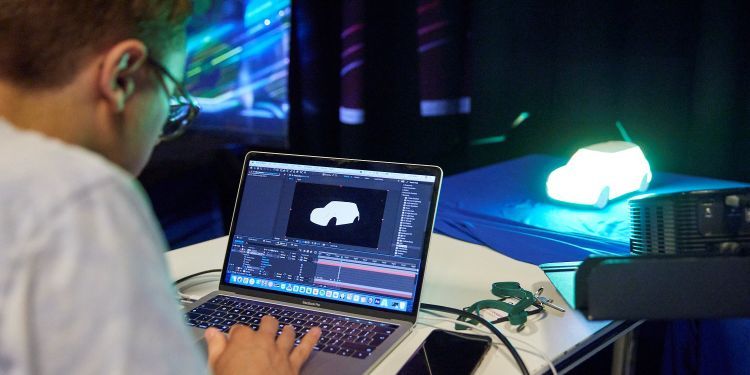
This five-day course for beginners gives you a unique opportunity to learn and develop the skills needed to design, prepare, and project video onto 3D structures. Working with industry-standard software Resolume Arena 7 and Adobe Creative Cloud you will move from first principles through to a finished mapped piece by the end of the week, combining technical knowledge with creative practice.
Laptops are provided for all participants. We encourage you to bring your own if it meets the specification below and has plenty of available storage.
Who is the course for?
- Anyone aged 16 and over with an interest in video projection.
- No prior experience with projection mapping software is required.
- A background or interest in digital art, animation, graphic design, motion graphics, video editing, technical theatre, live events, or gaming is an advantage but not essential.
What can I expect?
The course is both technical and creative. Projection mapping is the technique of projecting 2D video content onto 3D surfaces transforming everyday objects, sets, and structures into dynamic visual canvases. Over five days you will be introduced to the core principles and techniques of digital video mapping, building practical skills through guided exercises and a final showcase:
- Designing concepts for projection mapping
- Working with templates to plan and align content to your surface
- Creating content and sourcing material
- Preparing digital content: file types, resolutions, and codecs
- Setting up hardware: computers, projectors, and real-world objects
- Keystoning, image correction, and geometric distortion
- Masking and mapping 2D video content onto 3D objects
- Using a MIDI controller to trigger and manipulate content in real time
- Presenting a short projection-mapped piece on the final day
You will use Resolume Arena 7 together with Adobe After Effects and Photoshop to design, create, and perform with your content. This includes working with surface templates in Photoshop to ensure your designs align precisely with the object you are mapping onto.
Do I need anything for the course?
Laptops are provided for all participants, pre-configured and ready to use from Day 1.
We encourage participants to bring their own laptop if it meets the specification below and has plenty of available storage, video project files are large. If you plan to bring your own, please download Resolume Arena and Adobe Creative Cloud in advance; licence codes to activate will be provided on Day 1. If you already hold your own licences, you are welcome to use those instead.
You may also wish to bring an external drive to take your project files home, this is optional. Wi-Fi will be available if you prefer to upload your work instead.
Minimum specs
Windows
- Intel 6th Gen or AMD Ryzen 1000 series
- dedicated NVIDIA or AMD GPU with 4 GB VRAM
- 16 GB RAM
- M.2 SSD
- Windows 11 (required by Adobe After Effects)
macOS
- Apple M1 chip
- 16 GB unified memory
- 256 GB SSD (free space essential)
- macOS Sonoma 14
Recommended Specs
Windows
- Intel i7 11th Gen+ (6-core, 3.7 GHz) or AMD Ryzen 3000+
- NVIDIA RTX 4070 or equivalent with 8 GB VRAM
- 32 GB RAM
- M.2 SSD 512 GB or larger
- Windows 11
macOS
- Apple M2 Max or M3 Pro / M4, 32 GB unified memory
- 512 GB SSD or larger
- macOS Sonoma 14 or Sequoia 15
Please bring the correct video output adaptor for your machine (USB-C to HDMI or DisplayPort) and disable automatic updates and sleep mode before sessions begin. Not sure if your machine qualifies? Contact us before booking and we will advise.
Course Fee
£615
This course has now ended. Join our mailing list to hear about future dates and new courses or please contact shortcourses@gsmd.ac.uk if you have any questions.
-
Read our terms and conditions
-
Please note: accommodation is not provided
- Laptops are provided as standard, you do not need to arrange one in advance. If you plan to bring your own machine, please let us know when booking so we can confirm your spec ahead of the course.
Eligibility
- We welcome participants from all ages 16 and over
- Participants must have sufficient English language skills in order to fully engage with the course
About the Course Tutor
The course is taught by Angeline Ferguson, Video Design Lecturer at Guildhall School.
Angeline has been designing video projection for live events since the early 90s. She started VJ-ing at raves and in clubs using an assemblage of film and video projectors. Her raw scratch collage style inspired many collaborations with artists, writers, poets and musicians working in live performance.
She has worked as Video Designer on multiple large and small-scale theatre productions, including several site-specific productions with Boilerhouse Theatre Co and a stage production with percussionist Evelyn Glennie. In 2009 she completed an MA in 3D Computer Animation at Glasgow School of Art. More recently she has worked with Aardman Animation, BBC Learning, Tate Galleries and Historic Royal Palaces.
Angeline is based in East London where she has a studio at The Factory Project.


Find the Short Course that's perfect for you
Explore our Short Courses & Summer Schools